CRM Ticketing System: Centralize Support & Elevate CX
As customer expectations continue to rise, businesses need more than separate tools for customer records, support requests, and communication channels. X-Shift helps organizations bring these elements together through integrated customer experience solutions that improve visibility, response speed, and service quality. A CRM Ticketing System connects customer relationship management with ticket handling, giving support teams one place to understand each customer, manage requests, and track every interaction from first contact to resolution.
What Is a CRM Ticketing System?
A CRM Ticketing System combines customer relationship management capabilities with support ticket management in a single environment. Instead of treating every complaint or inquiry as an isolated case, the system links each request to the customer profile, previous interactions, and relevant service history. This helps employees respond with better context while giving managers a clearer view of customer needs, workloads, and recurring service issues.

Unified Customer Data
A CRM Ticketing System keeps customer details, conversation history, previous requests, and service notes connected in one profile. This reduces the need for employees to search through different applications or ask customers to repeat information they have already shared. By creating a consistent customer view, teams can provide faster responses, improve continuity between agents, and make support interactions feel more organized and personalized to improve customer experience.
Structured Ticket Management
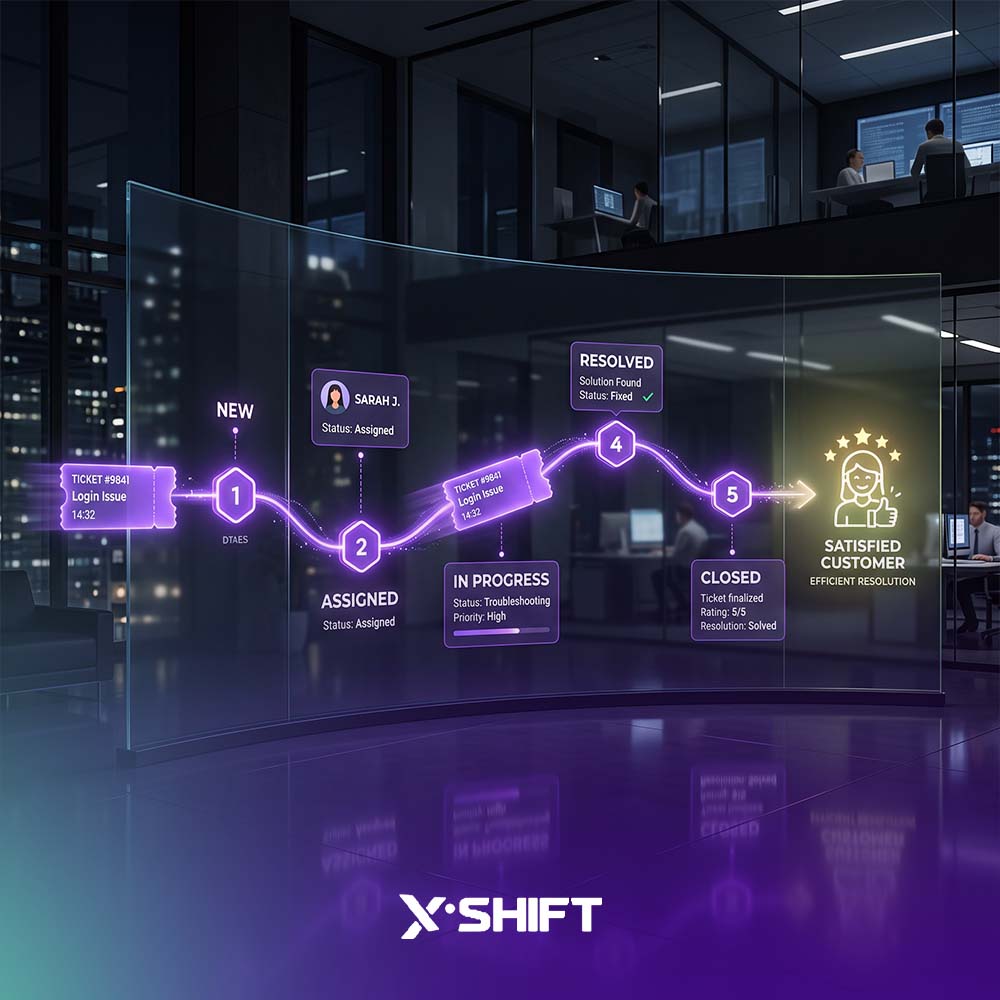
Every customer issue can be converted into a trackable ticket with a status, priority level, category, and assigned owner. A CRM Ticketing System makes it easier to see which requests are new, in progress, waiting for action, escalated, or resolved. This structured process reduces the risk of missed requests and gives both employees and managers greater control over daily support operations.
How Does the System Work?
The platform usually follows a clear service workflow from the moment a request is received until the issue is resolved. The goal is to capture every interaction, organize it correctly, assign responsibility, and maintain visibility throughout the process. Combining this with ai automation for business can also reduce repetitive manual work, helping support teams handle larger ticket volumes without sacrificing consistency or service quality.
Ticket Creation and Classification
When a customer contacts the business through email, phone, chat, or another supported channel, the request can be captured and converted into a ticket. The platform can organize the ticket based on issue type, product, service, urgency, or other business rules. This creates a reliable starting point for every case and makes it easier for teams to manage requests at scale.
Routing and Escalation
A CRM Ticketing System can route requests to the right employee or department according to predefined rules. Technical issues may go directly to a technical support team, while billing questions can be sent to finance. If a request remains unresolved for too long or requires a higher level of attention, escalation rules can notify supervisors or move the ticket to the appropriate team automatically.
Key Benefits of a CRM Ticketing System
The value of a CRM Ticketing System extends beyond organizing support requests. It can improve response times, reduce operational friction, strengthen collaboration, and provide useful data for better decisions. For organizations managing growing numbers of customers and communication channels, a unified platform can create a more consistent service process while helping teams work with less duplication and fewer manual tasks.
Faster and More Consistent Support
Because customer information and ticket history are available in one place, employees can understand the situation more quickly and respond with greater confidence. A CRM Ticketing System reduces the time spent searching for details, transferring cases unnecessarily, or asking customers to repeat information. This helps support teams deliver more consistent answers and improves the overall digital customer experience across multiple interactions.
Better Team Productivity
The platform can automate repetitive tasks such as ticket categorization, assignment, notifications, and status updates. By reducing manual administration, employees can focus more attention on solving complex customer issues. Managers also gain better visibility into workloads, which makes it easier to distribute responsibilities, identify bottlenecks, and support teams that may be dealing with unusually high request volumes.
Automation and Omnichannel Support
Modern customer service depends on speed, continuity, and the ability to manage conversations across different channels. A CRM Ticketing System can support this by combining automation with a unified view of customer interactions through an omnichannel customer contact centre. Instead of treating email, phone, chat, and social channels as separate service environments, organizations can connect them to the same customer record and support workflow.
Automated Workflows
With a CRM Ticketing System, organizations can create rules for prioritization, assignment, escalation, reminders, and follow-up actions. These workflows help ensure that important requests receive attention quickly and that routine tasks do not depend entirely on manual intervention. Businesses can also integrate ai customer service solutions to boost responsiveness.
Omnichannel Customer Context
Customers may begin a conversation through chat and continue later by email or phone. The system helps preserve the context of those interactions so the next employee can understand what has already happened. To learn more about seamless cross-channel journeys, read how to create an omnichannel strategy for a seamless customer journey.
Reporting and Performance Insights
The data captured inside a CRM Ticketing System can reveal far more than the number of open and closed tickets. It can help organizations understand why customers contact support, how long issues take to resolve, which teams are under pressure, and where recurring problems are appearing. Integrating tools like voc voe and research allows managers to improve both customer service performance and the processes behind it.
Measuring Response and Resolution Times
The platform can track how quickly teams respond to new requests and how long it takes to resolve them. Using call center analytics, managers can identify delays, evaluate service levels, and understand whether bottlenecks are caused by staffing, routing, process design, or issue complexity. Over time, these insights can support more realistic performance targets and better operational planning.
Identifying Recurring Issues
By analyzing ticket categories and customer complaints, the system can highlight problems that appear repeatedly. Organizations can also leverage social listening to capture broader feedback outside direct support channels. Instead of handling the same issue one customer at a time, the organization can investigate the root cause and improve the related product, service, or internal process.
How to Choose the Right CRM Ticketing System
Choosing the right platform should depend on business requirements rather than the number of features available. Organizations should consider current support workflows, customer channels, integration needs, reporting requirements, security controls, and expected future growth. A flexible platform should support current operations while making it easier to expand services, teams, and automation as customer expectations evolve.
Integration and Customization
A CRM Ticketing System should integrate with the tools and platforms the organization already uses, including knowledge management databases. It should also allow workflows, ticket categories, permissions, and escalation rules to be adjusted according to business needs. This flexibility is important because customer service processes vary widely between industries.
Security and Scalability
Customer service platforms handle sensitive information, so security and access control are essential considerations. The selected solution should support clear user permissions, reliable data protection, and scalable performance as the organization grows. Modern platforms may also benefit from advanced technologies like agentic ai to scale operations autonomously.
X-Shift CRM and Ticketing Solutions
X-Shift provides integrated customer experience solutions designed to help organizations centralize customer information, manage support requests, automate workflows, and improve service visibility. Its approach to CRM Ticketing System implementation focuses on connecting customer data, ticket operations, communication channels, and reporting so support teams can work within a more coordinated environment.
Integrated Customer Profiles and Ticket Management
X-Shift helps organizations create unified customer profiles that bring together key information, previous interactions, and support activity. Through a CRM Ticketing System, teams can manage requests more consistently, follow each case through its lifecycle, and reduce the operational gaps that often appear when customer data and support tools are separated across multiple platforms.
Flexible Workflows and Customer Experience Integration
X-Shift solutions support configurable workflows, automation, reporting, and integration with broader customer experience capabilities, including voice and chat bots. The result is a more connected customer service environment that can adapt as organizational requirements change.
experience capabilities. This allows a CRM Ticketing System to work alongside omnichannel contact center solutions, knowledge management, chatbots, voice bots, Voice of Customer programs, and social listening. The result is a more connected customer service environment that can adapt as organizational requirements change.
If your organization wants to centralize customer information, improve ticket handling, reduce manual processes, and deliver more consistent support, contact X-Shift today to align your support operations with a broader customer experience strategy.
Frequently Asked Questions
The following questions address some of the most common considerations businesses have when evaluating an integrated customer support platform, including how it differs from standard CRM or help desk tools and why integration, automation, and customer context matter in modern support operations.